On 7 October, OpenAI started rolling out GPT-6 to ChatGPT's 1.2 billion weekly users, and the headline feature is not a benchmark: it is Intelligent UI, where the model composes buttons, forms, charts and mini-tools on the fly. When the model draws the interface, the interface becomes part of the attack surface.
AG Tech Consulting's advice for clients this week: before your teams build or approve generative-UI features (in ChatGPT Enterprise or your own apps), treat every model-generated form, button and action as untrusted output, map what data it can collect and which actions it can trigger, and put a deterministic policy layer between the model and anything that submits, pays or sends.
What actually shipped
OpenAI's announcement describes GPT-6 in ChatGPT as running on two models: GPT-6 Sol for Plus, Pro, Business and Enterprise tiers, and GPT-6 Luna for Free and Go tiers. The rollout began 7 October for paid tiers and expanded to Free and Go the next day. Enterprise availability depends on workplace admin settings.
Intelligent UI lets responses include graphics, tappable buttons, forms, charts and "interactive experiences you can use directly in your conversation". Users can also ask ChatGPT to create a tool on demand, such as a savings calculator or a bill splitter.
How it works under the hood
OpenAI says it built a library of native, streamable components plus a compiler that processes the interface as the model generates it. The UI appears progressively, before the full response is complete.
The model was trained to choose layout, visuals and interactivity, and its generated interfaces were evaluated for clarity, usefulness and completeness. GPT-6 also interleaves thinking with answering: OpenAI reports GPT-6 Instant starts answering 44% sooner on web-search questions than GPT-5.6 Instant.
Architecturally, that means a token stream is now being compiled into live, interactive components in near real time. That is powerful. It is also exactly the pattern security teams spent twenty years learning to sandbox in browsers.
Why this is a security story
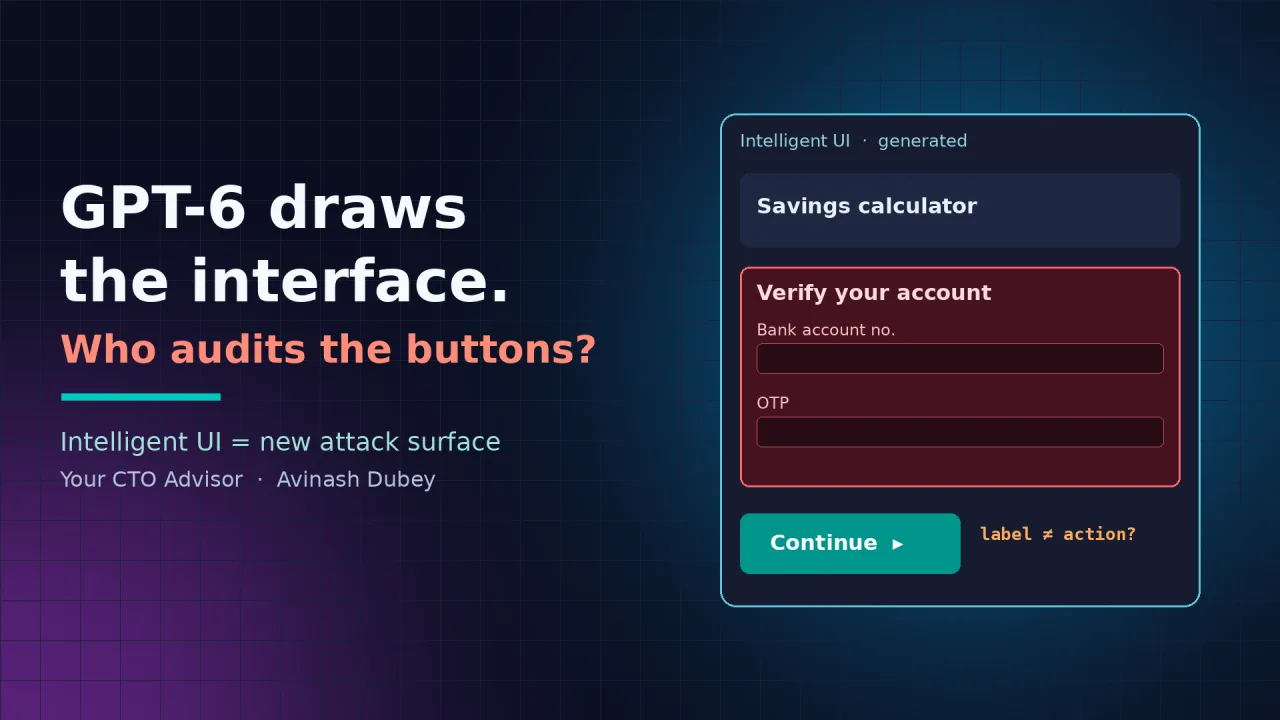
Text answers can mislead. Interfaces can act. A generated form can ask for an account number. A generated button can carry a label that does not match what it does. A generated tool can quietly bake in a wrong assumption that a user then trusts because it looks like software.
Combine that with indirect prompt injection, where hostile instructions hide in web pages or documents the model reads during search, and the risk shifts from "the model said something wrong" to "the model built a convincing UI on attacker instructions".
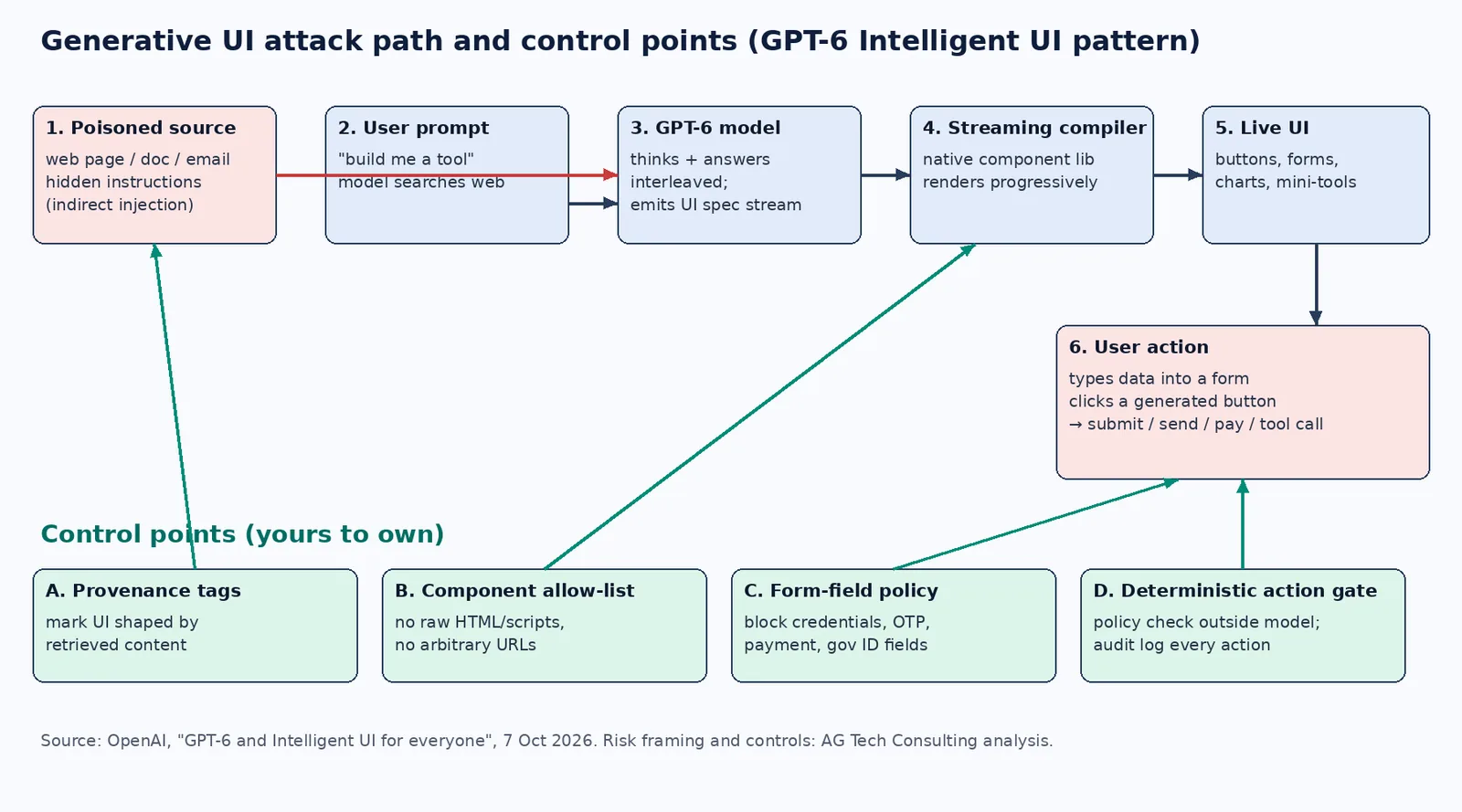
Five future risks to plan for now
1. Generative phishing inside a trusted frame. A poisoned web result steers the model to render a "verify your account" form. The user trusts it because it sits inside ChatGPT, not on a strange domain.
2. Label and action mismatch. Button text is generated, so is the payload behind it. Any future where generated components can call connectors or agent actions needs a check that the visible label matches the actual effect.
3. Data capture through forms. Forms invite structured input: salaries, IDs, customer records. That data lands in conversation history and, in enterprise settings, inside your retention and DPDP/GDPR scope.
4. Streaming before safety finishes. Progressive rendering and answer-while-thinking reduce latency. They also mean partial UI is visible before a full response exists, so output filters must work on streams, not just on finished answers.
5. Copycat generative UI in your own stack. Product teams will copy this pattern with open models and component libraries. Without a fixed, allow-listed component set and a compiler that refuses anything outside it, you are rendering model output as code.
What OpenAI says about safety
OpenAI states GPT-6 showed stronger resistance to attempts to bypass safety training, "particularly attacks that adapt across multiple turns", and uses conversation history to spot risks not visible in a single prompt. Details are in the GPT-6 system card. That is progress at the model layer. It does not replace controls at the interface and action layers, which are yours to own.
A CTO checklist for generative UI
Inventory where generative UI is enabled: ChatGPT Enterprise admin settings, internal copilots and customer-facing apps. Restrict rendering to a fixed, versioned component allow-list; no raw HTML, scripts or arbitrary URLs from the model. Block or flag generated forms that request credentials, payment data, government IDs or OTPs. Require a deterministic policy check, outside the model, before any generated control submits, pays, sends or calls a tool. Show provenance: mark which UI elements were shaped by retrieved web or document content. Apply streaming-aware output filtering so partial components are checked as they render. Log generated UI specs and user interactions for audit, with retention aligned to DPDP/GDPR. Red-team with indirect prompt injection: poisoned pages, documents and emails that try to make the model draw forms or buttons.
The bottom line
GPT-6's Intelligent UI is a real shift: software that adapts to people instead of people learning software. The same shift means the model is now a UI author. Treat its output like any untrusted front-end code: constrain it, verify it, and never let it pull a trigger on its own.
If you are rolling out ChatGPT Enterprise or building generative-UI features and want a threat model and control plan, write to me at avinash@agtechconsulting.ai or visit agtechconsulting.ai.
Source: OpenAI, "GPT-6 and Intelligent UI for everyone" (7 Oct 2026), openai.com/index/gpt-6-for-everyone
Originally published on LinkedIn in the Your CTO Advisor newsletter: read and comment on LinkedIn →